
TrendCrypt Guide
How to Read a Crypto Transaction
Learn how to read a crypto transaction by checking the transaction hash, network, sender and recipient addresses, confirmations, token contract, amount, fees, and transaction status.
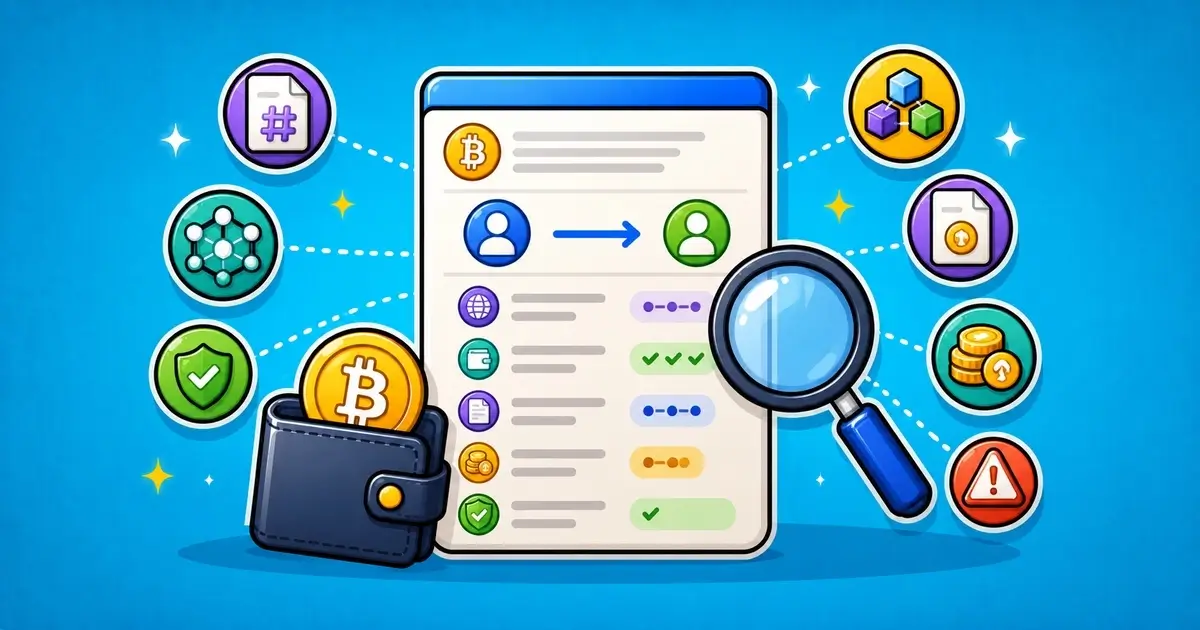
A crypto transaction can tell you a lot.
It can show the transaction hash, status, sender address, recipient address, amount, network, confirmations, token contract, and network fee. These details can help explain whether funds were sent, where they went, which network was used, and whether the transaction succeeded.
But a transaction does not explain everything.
A blockchain explorer can show what happened on-chain. It does not always show what a casino, exchange, wallet app, payment service, or trading platform did internally after receiving funds.
This guide explains how to read a crypto transaction, what each field means, and what to check when a deposit, withdrawal, wallet transfer, token approval, or platform payment does not look right.
Related safety pages include Crypto Payments, Wallet Safety, Crypto Deposit Not Showing? What to Check, Wrong Crypto Network Transfer, and Editorial Policy.
Key Takeaways
- A transaction hash is the unique ID used to find a blockchain transaction
- Always check the transaction on the correct network explorer
- A successful on-chain transaction does not always mean a platform has credited the account
- Sender, recipient, token contract, network, and confirmations all matter
- USDT, USDC, and other tokens can exist on several networks
- Missing memos, wrong networks, unsupported tokens, or wrong recipient addresses can cause deposit problems
- A failed transaction usually means the intended transfer did not complete, though gas may still be spent
- Never share seed phrases, private keys, wallet passwords, or authentication codes with support
What Is a Crypto Transaction?
A crypto transaction is an action recorded on a blockchain.
It may be a simple transfer from one wallet to another. It may also be a token transfer, smart contract interaction, wallet approval, NFT transfer, bridge action, swap, casino deposit, exchange withdrawal, or platform payment.
Most transactions have a public record.
That record can usually be searched with a transaction hash, also called a TXID.
A transaction record can help answer questions like:
- Did the transaction happen?
- Did it succeed or fail?
- Which network was used?
- Which address sent the funds?
- Which address received the funds?
- What asset moved?
- How much was sent?
- How many confirmations does it have?
- Was a memo, tag, or payment ID needed?
- Did the transaction interact with a contract?
These details are useful when checking missing deposits, delayed withdrawals, wrong-network transfers, suspicious wallet activity, or platform disputes.
The Main Parts of a Crypto Transaction
Start with the basic fields.
Crypto Transaction Fields to Check
| Field | What It Means | What to Do |
|---|---|---|
| Transaction hash | The unique ID for the blockchain transaction | Use it to search the transaction on the correct explorer |
| Status | Shows whether the transaction succeeded, failed, or is pending | A failed transaction usually did not complete the intended transfer |
| Network | Shows which blockchain the transaction happened on | Make sure it matches the platform or wallet network used |
| Sender address | The wallet or contract that sent the transaction | Check whether it matches the wallet you used |
| Recipient address | The wallet or contract that received the transaction | Compare it with the deposit or withdrawal address |
| Confirmations | Shows how many blocks have confirmed the transaction | Platforms may require a minimum number before crediting |
| Token contract | Shows which token was transferred | Important when checking USDT, USDC, or similar tokens |
| Network fee | The fee paid to process the transaction | This is not usually the same as the platform fee |
Do not rely on one field only.
A transaction can show “success” and still be the wrong token, wrong network, wrong recipient, or missing a memo needed by the platform.
Transaction Hash or TXID
The transaction hash is the transaction’s unique ID.
It is usually a long string of letters and numbers. You can copy it from your wallet, exchange withdrawal page, casino deposit history, or blockchain explorer.
The TXID is useful because it lets support teams and users check the same transaction.
A TXID is usually safe to share.
It does not give access to your wallet.
But be careful where you share it. Fake support accounts may use real transaction details to sound more convincing.
Never share seed phrases, private keys, wallet passwords, authentication codes, or full account access details with anyone asking to “verify” a TXID.
Use the Correct Blockchain Explorer
A transaction must be checked on the correct network.
For example, a USDT transfer may happen on Ethereum, TRON, BNB Chain, Polygon, Arbitrum, Optimism, Solana, Avalanche, or another network.
The token symbol alone is not enough.
If you search a BNB Chain transaction on an Ethereum explorer, it may not appear. That does not mean the transaction never happened. It may simply be on another chain.
Before checking the TXID, identify the network used by the wallet or platform.
Common examples include:
- Bitcoin explorer for BTC transactions
- Etherscan for Ethereum transactions
- BscScan for BNB Chain transactions
- PolygonScan for Polygon transactions
- Arbiscan for Arbitrum transactions
- BaseScan for Base transactions
- Tronscan for TRON transactions
- Solscan for Solana transactions
The exact explorer depends on the chain.
Transaction Status
Status tells you whether the transaction completed on-chain.
Common Crypto Transaction Statuses
| Status | What It Means | What to Check |
|---|---|---|
| Pending | The transaction is waiting to be confirmed | Wait and check whether the network is congested |
| Success | The transaction completed on-chain | Check recipient, amount, token, and network |
| Failed | The transaction did not complete as intended | Funds usually remain with the sender, minus gas where applicable |
| Dropped or replaced | The transaction may have been cancelled or replaced by another transaction | Check wallet history and nonce details |
| Confirmed but not credited | The blockchain shows success, but the platform balance has not updated | Check platform crediting rules and support evidence |
A successful transaction means the blockchain accepted the action.
It does not automatically mean a third-party platform credited your internal balance.
For example, a casino deposit may be successful on-chain but still wait for internal processing, minimum confirmations, token checks, memo matching, or manual review.
Confirmations
Confirmations show how many blocks have been added after the transaction.
Many platforms wait for a minimum number of confirmations before crediting deposits.
The required number depends on the platform and network.
A platform may require:
- 1 confirmation
- 3 confirmations
- 6 confirmations
- 12 confirmations
- more for slower or higher-risk networks
If a transaction is new, it may show success on-chain but not yet meet the platform’s confirmation threshold.
If the transaction has enough confirmations and still is not credited, check the recipient address, network, token contract, amount, memo or tag, minimum deposit amount, and platform status.
Read Crypto Deposit Not Showing? What to Check for the full missing-deposit checklist.
Sender and Recipient Addresses
The sender address shows where the transaction came from.
The recipient address shows where it went.
For a deposit, the recipient should usually match the deposit address shown by the platform for that asset and network.
For a withdrawal, the recipient should usually match the wallet address you entered.
Be careful with copied addresses.
Check the first and last characters, but do not rely only on that for large transfers. Clipboard malware and address poisoning scams can create addresses that look similar.
If the recipient address is wrong, the transaction may be difficult or impossible to reverse.
Common Address Problems
Address issues are one of the most common causes of crypto payment problems.
Address Problems to Watch For
| Problem | What It Means | What to Do |
|---|---|---|
| Wrong recipient address | Funds may have gone to an unintended wallet | Blockchain transfers are usually irreversible |
| Wrong network | The address may be correct, but the chain is unsupported by the platform | Check platform network support before assuming recovery is possible |
| Contract address instead of wallet | The transfer may have gone to a token or smart contract address | Check whether the contract can receive or return funds |
| Missing memo or tag | Some platforms need a memo, tag, or payment ID to credit the deposit | Contact support with TXID and account details |
| Internal platform address | The platform may move funds after receiving them | Internal movements do not always mean the user was credited |
If a platform controls the receiving address but the deposit was sent on the wrong network or without a memo, support may sometimes be able to help.
But recovery is not guaranteed.
Do not trust anyone who contacts you privately and claims they can recover funds for a fee.
Network Matters
The network is one of the most important details.
The same token symbol can exist on several networks.
For example, USDT can exist on TRON, Ethereum, BNB Chain, Polygon, Solana, and other networks. A platform may support USDT on one network but not another.
Before sending funds, check:
- asset
- network
- deposit address
- token contract
- memo or tag requirement
- minimum deposit amount
- platform support for that network
- withdrawal fee and confirmation rules
A successful transaction on the wrong network can still create a platform problem.
Read Wrong Crypto Network Transfer if you suspect the wrong chain was used.
Native Coin vs Token Transfer
A blockchain transaction can move the native coin, a token, or both.
For example:
- ETH is the native coin on Ethereum
- BNB is the native coin on BNB Chain
- MATIC may be used as gas on Polygon
- TRX is the native coin on TRON
- SOL is the native coin on Solana
- USDT and USDC are tokens on several networks
Some explorers show the main transaction value near the top, while token transfers appear in another section.
This can confuse users.
A transaction may show 0 ETH as the main value but still include a USDT transfer inside the token transfer area.
Transaction Types to Recognize
| Type | What It Means | What to Check |
|---|---|---|
| Native coin transfer | The chain’s main asset moved, such as ETH, BTC, BNB, SOL, or TRX | Check amount, recipient, and fee |
| Token transfer | A token moved on top of a network, such as USDT or USDC | Check token contract and decimals |
| Internal transfer | A contract action moved value inside the transaction | Look for token transfer events, not only the main value field |
| Approval transaction | Permission was granted, but funds may not have moved immediately | Review spender and allowance |
| Contract interaction | The wallet interacted with a smart contract | Check logs, token transfers, and method name if available |
For token deposits, check the token transfer section, not only the main value field.
Token Contract Address
A token contract address identifies the token on a specific network.
This matters because token symbols can be copied.
A fake token can use the same symbol as a real one.
For example, a token may display as USDT or USDC, but the contract address may not match the real token supported by the platform.
Before sending tokens to a platform, check whether the platform supports:
- the token
- the network
- the exact token contract, where relevant
- the minimum deposit amount
- any memo, tag, or payment ID
If a platform only supports official USDT on TRON and you send a copied token on another network, the deposit may not be credited.
Network Fees
Network fees are paid to process blockchain activity.
They are not usually the same as platform fees.
Depending on the network, this fee may be called gas, miner fee, transaction fee, or network fee.
A transaction may involve:
- the amount sent
- network fee
- platform withdrawal fee
- exchange spread or service fee
- bridge fee, if bridging
- smart contract execution cost
Do not confuse the network fee with the transfer amount.
For example, sending 100 USDT may also require TRX, ETH, BNB, MATIC, or another native asset for fees depending on the chain.
Failed Transactions
A failed transaction usually means the intended action did not complete.
But the gas or network fee may still be spent, especially on smart contract networks.
A transaction may fail because of:
- not enough gas
- slippage settings
- contract error
- expired transaction
- wrong method
- rejected contract condition
- network congestion
- insufficient token balance
- paused or blocked contract
- user replaced the transaction
If a transfer failed, check whether the token actually moved.
Do not assume funds left the wallet just because a transaction appears in history.
Look at the status and token transfer events.
Pending Transactions
A pending transaction is waiting to be confirmed.
This can happen during network congestion, low gas, wallet nonce issues, or temporary explorer delays.
If a transaction is pending:
- wait for network confirmation
- check whether the wallet allows speed-up or cancellation
- do not resend blindly
- check the nonce if you understand advanced wallet settings
- avoid using fake “transaction fixer” links from DMs or comments
Fake support often targets users with pending transactions.
Do not enter seed phrases or connect wallets to random “fix pending transaction” pages.
Internal Platform Crediting
A blockchain explorer shows the on-chain transaction.
A platform balance is an internal record controlled by the platform.
A deposit can be confirmed on-chain but not credited internally because of:
- not enough confirmations
- wrong network
- unsupported token
- missing memo or tag
- amount below minimum deposit
- maintenance or wallet delay
- risk review
- KYC hold
- manual processing
- platform outage
- suspicious transaction review
This is why a TXID is only part of the evidence.
If you contact support, include the TXID, asset, network, amount, deposit address, time, and account ID if safe to share through the official support channel.
Reading a Transaction for a Missing Deposit
If a deposit is not showing, check:
- TXID
- status
- network
- confirmations
- sender address
- recipient address
- token contract
- amount
- memo, tag, or payment ID
- minimum deposit amount
- platform maintenance status
- platform support rules
If all on-chain details look correct, the issue may be internal platform crediting.
Save screenshots and contact official support.
Do not trust private messages from people claiming they can credit the deposit by syncing your wallet.
Reading a Transaction for a Delayed Withdrawal
For a delayed withdrawal, first check whether a TXID exists.
If the platform has provided a TXID, the withdrawal may already be broadcast on-chain. Then you can check status, confirmations, recipient address, and amount.
If no TXID exists, the withdrawal may still be inside the platform’s internal process.
That could mean:
- pending approval
- KYC review
- security review
- bonus review
- manual payout queue
- payment provider delay
- withdrawal limit
- platform restriction
A blockchain explorer cannot show a transaction that has not been broadcast.
For casino payout issues, read Delayed Crypto Casino Withdrawals.
Reading a Transaction for Suspicious Wallet Activity
If you see a transaction you do not recognize, check:
- whether it was a transfer, approval, or contract interaction
- which token or NFT moved
- which contract was involved
- which address received funds
- whether a suspicious approval happened before the transfer
- whether other assets remain exposed
- whether the same wallet signed a phishing request recently
A suspicious transaction may come from a wallet approval, malicious signature, wallet drainer, fake claim page, or seed phrase compromise.
Read Crypto Wallet Signatures Explained and Crypto Wallet Drainers Explained if the transaction came after a wallet prompt.
Mistakes to Avoid
Reading transactions gets easier with practice, but a few mistakes are common.
Mistakes to Avoid When Reading Crypto Transactions
| Mistake | Why It Can Mislead You |
|---|---|
| Using the wrong explorer | A TXID must be checked on the correct network |
| Checking only the status | Success does not prove the platform credited the account |
| Ignoring token contract | Fake or wrong tokens can look similar by symbol |
| Confusing gas fee with transfer amount | Network fees are separate from the asset sent |
| Sharing private information with fake support | A TXID is safe to share, but seed phrases and passwords are not |
The biggest mistake is checking only whether the transaction says “success.”
Success is important, but it is not the whole story.
You still need to check the right network, right token, right recipient, and platform crediting rules.
What to Send Support
If you contact support about a transaction, send only useful details through official support channels.
Useful details may include:
- TXID
- asset
- network
- amount
- deposit or withdrawal address
- time and date
- account username or ID
- memo, tag, or payment ID, if relevant
- screenshots of the platform deposit or withdrawal page
- explorer screenshot or link
- short explanation of the issue
Do not send:
- seed phrase
- private key
- wallet password
- authentication codes
- full identity documents unless requested through a verified KYC channel
- remote-access app details
- unnecessary private wallet history
Real support may need a TXID.
Real support should not need your recovery words.
Report a Transaction Issue Pattern
If you found repeated missing deposits, wrong-network confusion, suspicious token contracts, fake support linked to transaction problems, wallet-drainer transactions, or platform payment issues, you can send a redacted report to [email protected].
Useful details may include:
- platform URL
- TXID
- asset
- network
- wallet address
- token contract
- screenshots
- support messages
- complaint links
- a short timeline
Do not send seed phrases, private keys, wallet passwords, authentication codes, full identity documents, or anything that could give access to your wallet or accounts.
TrendCrypt can review patterns and publish safety warnings, but we cannot reverse blockchain transactions, access wallets, recover funds, force platforms to credit deposits, approve withdrawals, or guarantee platform action.
Final Thoughts
A blockchain transaction is one of the best pieces of evidence in crypto.
It can show whether a transfer happened, which network was used, which address received funds, how many confirmations exist, which token moved, and whether a transaction succeeded or failed.
But it has limits.
It does not always show whether a platform credited your account, why a withdrawal is still pending internally, whether KYC is holding a payout, or whether support will recover a wrong-network deposit.
Read the transaction carefully. Check the network, status, addresses, token contract, confirmations, and fees. Then compare the on-chain facts with the platform’s own rules.
The TXID tells part of the story.
The platform’s internal records may tell the rest.
FAQ
What is a transaction hash?
A transaction hash, or TXID, is the unique ID for a blockchain transaction. It can be used to find the transaction on a blockchain explorer.
Is a TXID safe to share?
A TXID is usually safe to share because it does not give access to your wallet. Still, share it only through official support channels when dealing with platform issues.
Why does my transaction say successful but my deposit is not credited?
The platform may still be waiting for confirmations, checking the network, matching a memo or tag, reviewing the token contract, applying minimum deposit rules, or processing the deposit internally.
How do I know if I used the wrong network?
Check the network shown on the explorer and compare it with the network supported by the receiving platform for that asset.
Why does my transaction show 0 ETH but I sent USDT?
Some token transfers show the native coin value as zero while the actual token movement appears in the token transfer section.
What are confirmations?
Confirmations show how many blocks have been added after the transaction. Platforms often require a certain number before crediting deposits.
What does a failed transaction mean?
A failed transaction usually means the intended action did not complete. On smart contract networks, the gas fee may still be spent.
Can TrendCrypt recover a wrong transaction?
No. TrendCrypt can explain transaction details and review safety patterns, but we cannot reverse blockchain transactions, access wallets, recover funds, or force platforms to credit deposits.
Unexpected KYC During Withdrawal: What to Check
Learn what to check when a crypto platform or crypto casino asks for KYC during withdrawal, including verification timing, requested documents, privacy rules, support channels, and payout status.
Crypto Casino and Betting Scams: Warning Signs
Learn how crypto casino and betting scams use unclear ownership, fake bonuses, cloned sites, withdrawal release fees, private support messages, fake KYC links, and wallet-drainer tactics.

Fake Crypto Support Scams: Warning Signs
Learn how fake crypto support accounts target users after wallet, withdrawal, deposit, KYC, or account problems by pretending to represent platforms, exchanges, casinos, wallets, or recovery teams.